MEPCO Load Shedding Schedule: How to Check Yours
The first time you really care about a load shedding schedule is usually five minutes before the electricity goes out.
You might be working, charging your phone, running a water pump, or simply trying to get through a hot afternoon. Then the power disappears and the immediate question is not complicated: when is it coming back?
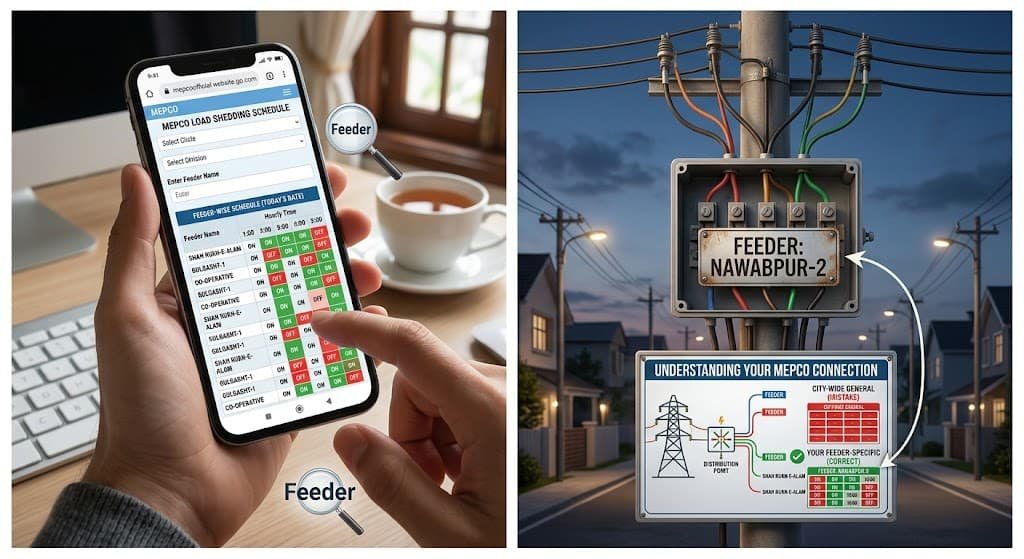
That is where the MEPCO load shedding schedule becomes useful. The problem is that many people search for a general schedule for their city and expect it to tell them exactly when their own connection will lose power. MEPCO’s system is more specific than that. Its published material refers to feeder-wise load shedding, which means the relevant schedule depends on the network serving your area.
I have found that this distinction saves a lot of confusion. A neighbor a few streets away can have electricity while your supply is off, and that does not automatically mean that one of the schedules is wrong.
1. Your MEPCO Load Shedding Schedule Is Usually Feeder-Specific
The word “schedule” makes it sound like there is one simple timetable covering everyone in a city. That is not how MEPCO’s published system is organized.
MEPCO describes a feeder-wise load shedding schedule. In its own procedure, the company says the feeder-wise schedule is displayed after the relevant authorized user accesses the load-shedding section of its website.
That matters because your electricity supply is connected to a particular distribution network. Two households in the same town do not necessarily sit on the same feeder.
So if someone tells you:
“The power goes off from 2 PM to 4 PM in our area.”
Treat that as useful local information, not automatically as your official schedule.
The timing could be different for your feeder.
MEPCO’s customer-service information also says that load-shedding schedules are updated on its website for customers’ information.
What is a feeder?
A feeder is part of the electricity distribution network that supplies power from a grid or distribution point toward consumers.
You do not normally need to understand the engineering behind the feeder just to check a schedule. What matters is identifying which feeder serves your connection.
This is one reason a city name alone is not always enough.
2. How to Check the MEPCO Load Shedding Schedule
Start with MEPCO’s official website rather than relying on an old timetable shared on Facebook or WhatsApp.
MEPCO’s website lists load shedding as one of its customer-service facilities, alongside services such as duplicate bills, net metering and tariff information.
The basic process is straightforward:
Step 1: Open the MEPCO website
Go to the official MEPCO website and look for the service related to load shedding or the load-shedding schedule.
The published MEPCO procedure specifically instructs users to open the MEPCO website and select “Update Load Shedding” from the Services menu. That particular page describes the administrative process used to update feeder schedules, so ordinary consumers should not assume they need the same login credentials mentioned there.
Step 2: Look for the applicable feeder information
The important part is finding the schedule associated with your feeder or supply area.
If you already know your feeder name, the process is much easier.
If you do not know it, your local MEPCO subdivision or customer service office is a practical place to ask.
MEPCO also publishes customer service contact information and identifies 0800-63726 as its customer service number.
Step 3: Check the timing carefully
Do not just look at the first time period you see.
A proper schedule may divide the day into individual time slots. MEPCO’s published load-management documents, for example, have used hourly columns covering the full day, with feeder-level information showing when particular feeders were scheduled on or off.
That format is much more useful than a vague statement such as “load shedding in the evening.”
Step 4: Check the date of the schedule
This is the part people skip.
A schedule from last year is not proof of today’s schedule.
MEPCO’s website has separate pages for shutdown and maintenance schedules, and the published records include specific memo numbers and dates.
So always look at the date before planning your day around an old timetable.
For someone who checks MEPCO information regularly through mepcco-bill.pk, I would use the same rule: treat the date and source of a schedule as seriously as the actual time printed on it.
3. Load Shedding and Planned Shutdowns Are Not the Same Thing
This is probably the biggest source of confusion.
You see the electricity go off and call it load shedding. Sometimes that is correct. Sometimes the interruption is related to maintenance, repair work, a fault, or a planned shutdown.
MEPCO maintains separate published information for shutdown and load-shedding-related schedules. Its shutdown page contains notices for individual circles and dates, including Multan, Sahiwal, Vehari, Bahawalnagar and Rahim Yar Khan.
That distinction is useful when the timing does not match the regular pattern you expected.
Consider this simple reference:
| Situation | What it may indicate | What to check |
|---|---|---|
| Power goes off at a repeated scheduled time | Planned load shedding | Feeder-wise schedule |
| Power goes off for a specific maintenance window | Planned shutdown | MEPCO shutdown notice |
| Unexpected outage with no published timing | Fault or local interruption | Local complaint/service channel |
| Neighbor has power but you do not | Different feeder or local issue | Your feeder and supply status |
| Power returns earlier or later than expected | Operating conditions may have changed | Latest available schedule |
The important point is not to force every outage into the same category.
And this is where people usually go wrong. They find an old “load shedding schedule” through a search engine, see that the timing does not match their outage, and assume MEPCO has ignored the schedule. The document may simply be outdated or may refer to a different feeder.
Planned shutdowns can have their own notices
MEPCO’s published shutdown material shows that planned work can be associated with particular circles and specific dates.
That means a temporary interruption should be checked against both the regular load-shedding information and any relevant shutdown or maintenance notice.
4. Why Your Area May Not Follow the Schedule You Found Online
There are several practical reasons.
The first is that online schedules become outdated.
The second is that people frequently share schedules without mentioning the feeder, date, or circle.
The third is that electricity distribution is not organized purely around neighborhood names.
A schedule for one feeder does not become the schedule for every nearby street simply because the streets are geographically close.
MEPCO’s own published material demonstrates how detailed these schedules can be. Its load-management document includes feeder codes, grid-station names, feeder names, loss categories and individual hourly periods.
That level of detail is why a copied screenshot with only a city name is not enough to establish the schedule for every consumer.
The schedule can also change
This is another reason not to save one image on your phone and rely on it indefinitely.
MEPCO’s website describes load-shedding information as something that is updated for customer information.
So if your normal timing suddenly changes, check for a newer schedule before assuming that the older one is still active.
If you are already dealing with other MEPCO service questions, such as billing or payment problems, keeping the official source bookmarked is useful. For example, you can also read MEPCO Bill Payment Failed but Amount Deducted? for a separate billing issue.
5. A Simple Way to Keep Track of Your Own Schedule
You do not need a complicated spreadsheet.
Once you identify your feeder and find a current schedule, write down the information in a small format that is easy to check.
Quick reference
My MEPCO details
- Circle: __________
- Division: __________
- Subdivision: __________
- Feeder: __________
- Schedule date: __________
- Expected outage: __________
- Expected restoration: __________
- Official source checked: __________
This takes less than a minute and prevents a surprisingly common problem: forgetting which feeder or schedule you were looking at.
I would also keep the date beside the timing. A note saying “power off 6 to 8 PM” is much less useful three months later if you cannot remember where it came from.
There is another small benefit. If the actual outage repeatedly differs from the published schedule, you now have something concrete to discuss with the relevant MEPCO office instead of simply saying, “The electricity keeps going.”
6. What to Do When the Power Goes Out Outside the Published Timing
First, give the situation a quick check.
Look at nearby houses or businesses if you can do so safely. If the entire area is without power, the interruption is probably not limited to your individual connection.
Then check whether there is a known shutdown or maintenance notice.
If the interruption is unexpected and continues, contact the appropriate MEPCO customer service or local complaint center. MEPCO publishes 0800-63726 as a customer-service contact, and its FAQ directs customers to their relevant subdivision complaint center for information about restoration of disconnected supply.
Keep the information simple when reporting the problem:
- Your reference or consumer details
- Your location
- The approximate time the outage started
- Whether nearby connections are also affected
- Whether the interruption matches a published schedule
That last detail is especially useful.
If you are also trying to resolve a billing problem, it helps to keep those two issues separate. A load-shedding interruption does not by itself explain an incorrect meter reading or an arrears entry. For billing-related information, you can also refer to MEPCO Meter Reading Wrong? Here Is How to Fix It.

7. The Difference Between a Schedule and a Guarantee
A published schedule is useful for planning, but I would not treat it as a guarantee that electricity will switch off and return at exactly the same minute every day.
Electricity distribution involves an operating network, and planned maintenance or other interruptions can occur separately from ordinary load-management schedules.
The MEPCO website itself separates load-shedding information from shutdown and maintenance information.
So use the schedule as a planning reference.
If you need to run a water pump, charge backup batteries, work online, or arrange another electricity-dependent activity, leave some room around the published timing rather than planning everything down to the minute.
That sounds like a small distinction, but it makes the schedule much more useful in real life.
8. A Few Common Mistakes Worth Avoiding
Using an old screenshot
This is probably the easiest mistake to make.
A screenshot can look official even when it is months old. Check its date and source before relying on it.
Checking only the city name
Your city is not necessarily enough to identify your feeder.
Look for the feeder-level information that applies to your connection.
Confusing maintenance with load shedding
A planned shutdown may have its own notice and timing. MEPCO’s published shutdown records show that these notices are issued for specific circles and dates.
Assuming every nearby house has the same schedule
Two nearby streets can be supplied differently. If your neighbor’s electricity stays on while yours goes off, that alone does not prove that your schedule is wrong.
Ignoring the official source
Social media posts can be useful for spotting that other people are experiencing an outage, but they are not a substitute for checking the latest official information.
This is one reason I keep the distinction clear on mepcco-bill.pk between information that helps consumers understand their MEPCO services and information that should be confirmed directly with MEPCO.
9. What I Would Check Before Calling MEPCO
Before making a complaint about an unexpected outage, I would make five quick checks:
- Is there a current feeder-wise load-shedding schedule?
- Does my feeder appear on it?
- Is the schedule dated recently?
- Is there a separate shutdown or maintenance notice?
- Are nearby consumers affected too?
If the answer to all five points still leaves the outage unexplained, contacting MEPCO becomes much more useful because you have already ruled out the obvious explanations.
And keep the reference number or complaint details if you report the problem. If the issue happens repeatedly, a record of dates and times is more useful than trying to remember everything later.
Frequently Asked Questions
How can I check my MEPCO load shedding schedule?
Check MEPCO’s official website for the applicable load-shedding information, paying particular attention to feeder-level details. MEPCO’s published procedure identifies a feeder-wise load-shedding schedule system.
Why is my electricity off when the schedule says it should be on?
The schedule may relate to a different feeder, may no longer be current, or the interruption may be connected to a planned shutdown, maintenance activity, or an unexpected fault. Check the latest schedule and relevant shutdown information before deciding that the published timing is incorrect.
Does every area in a MEPCO city have the same load shedding?
No. MEPCO’s published material is organized at feeder level, so different parts of the same city or locality can have different supply arrangements and timings.
What should I do if the power is off outside the scheduled time?
Check for a shutdown or maintenance notice first. If the outage is unexpected or continues, contact your relevant MEPCO complaint center or use the customer-service contact listed by MEPCO, including 0800-63726.
Is a planned shutdown the same as load shedding?
No. MEPCO publishes separate information for shutdown and maintenance activities, including notices tied to specific circles and dates.
A useful MEPCO load-shedding check is really quite simple once you stop looking for one timetable for an entire city. Find the feeder, check the date, compare the timing with any shutdown notice, and only then decide whether the outage is unusual.
That small habit saves a lot of guesswork.
For more MEPCO service information, visit mepcco-bill.pk.