
Check Your MEPCO Bill Online – Duplicate Bill, Payment, Tariff & Consumer Guide
Checking an electricity bill should not require a visit to a MEPCO office or a long wait at a payment counter. If you receive your electricity supply through the Multan Electric Power Company (MEPCO), you can check your latest bill online using the information printed on your previous bill.
On MEPCCO-bill.pk, consumers can find helpful information about checking a MEPCO bill, understanding bill charges, making payments, finding important MEPCO services, checking tariff information, registering complaints, and managing common electricity-related issues.
The easiest way to find your latest bill is to use your 14-digit reference number. Depending on the service available to your connection, a consumer ID may also be used. Once your bill is retrieved, you can review important details such as the billing month, due date, payable amount, units consumed, meter information, and applicable charges.
MEPCO Bill Checker
Check Your Electricity Bill Online Instantly
Table of Contents
What You Need to Check Your MEPCO Bill
Before checking your bill online, keep your previous electricity bill nearby. You will normally need one of the following:
- 14-digit reference number
- Consumer ID, where supported by the bill-checking service
Your reference number and other consumer information are printed on your electricity bill. Enter the details carefully because one incorrect digit can prevent the system from finding the correct record.
After entering the required information, select Check Bill. Your available bill information should then appear on the screen.
What Can You See on a MEPCO Bill?
Depending on the bill and the information provided by the billing system, you may find:
- Consumer name
- Reference number
- Consumer ID
- Billing month
- Meter reading information
- Previous and current readings
- Units consumed
- Bill amount
- Due date
- Amount payable within the due date
- Amount payable after the due date
- Taxes
- Surcharges
- Adjustments
- Other applicable billing charges
Checking your bill before the due date gives you time to review the amount and arrange payment.
How to Check Your MEPCO Bill Online
The online bill-checking process is straightforward. You do not need to understand the technical details behind electricity billing to find your bill.
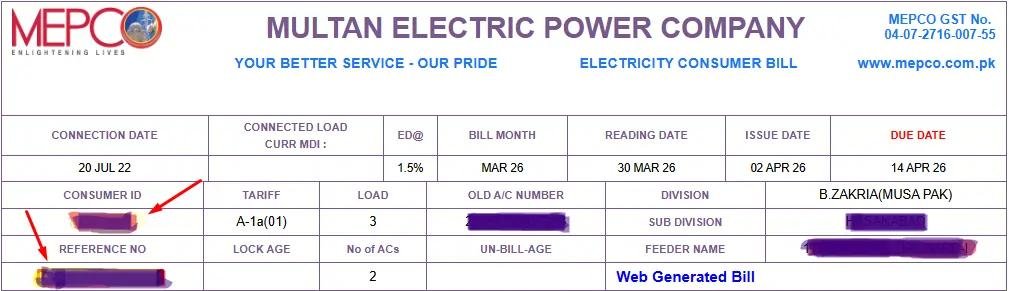
Step 1: Find Your Reference Number
Take your previous MEPCO electricity bill and look for the 14-digit reference number. Keep the number exactly as it appears on the bill. If your service supports another identification method, you may also use the consumer ID shown on your bill.
Step 2: Enter the Number
Enter your reference number into the MEPCO bill checker on this website. Make sure there are no missing digits. Carefully compare the number you entered with your previous bill.
Step 1: Check Your Bill
Click the Check Bill button. The system will process the information and display the available bill record.
Step 4: Review the Bill
Once the bill appears, check the:
- Consumer name
- Billing month
- Current units
- Due date
- Payable amount
- Previous balance, if applicable
- Taxes and adjustments
- Meter reading information
Step 5: Save or Print Your Bill
If you need a copy for your records, save the bill digitally or print it when the available bill page provides that option. Keeping digital copies of previous bills can be useful when you need to compare electricity consumption or resolve a billing problem.
Check MEPCO Bill Using the 14-Digit Reference Number
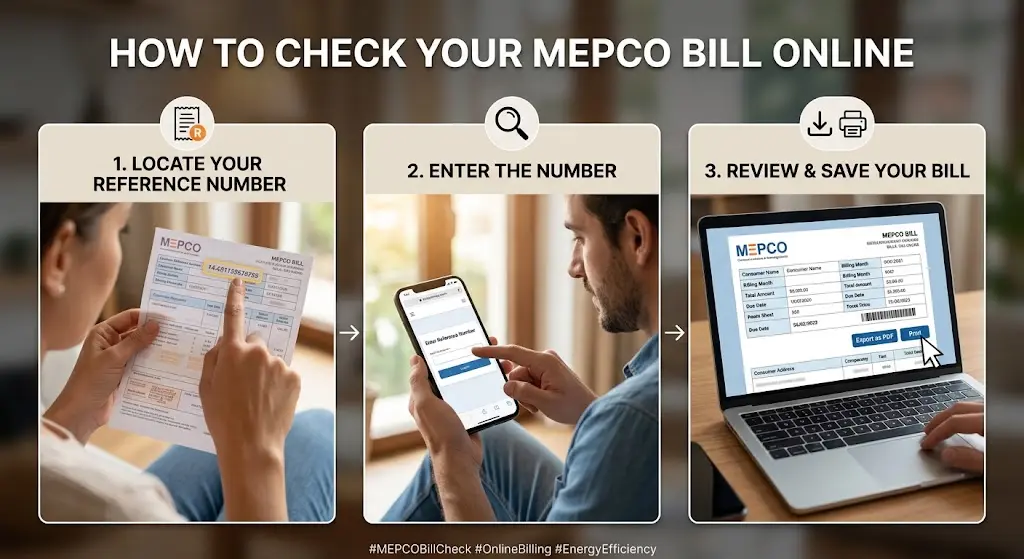
The reference number is one of the most useful pieces of information for accessing your electricity bill. It is printed on your previous MEPCO bill and is normally used to identify your electricity connection in bill-related services.
How to Check Using the Reference Number
- Take your latest or previous MEPCO bill.
- Locate the 14-digit reference number.
- Enter the number into the bill checker.
- Check the number again before submitting it.
- Click Check Bill.
- Review the bill details displayed on the screen.
- Save or print the bill if you need a copy.
Using the correct reference number reduces the chance of entering information for the wrong connection.
Why Should You Check the Number Before Submitting?
A reference number contains several digits, so it is easy to accidentally type one digit incorrectly. A missing or incorrect digit can result in an error or prevent the bill from being found. For this reason, compare the number on your screen with the number printed on your previous bill before clicking the button.
Can You Check a MEPCO Bill Without the Reference Number?
If you do not have your reference number available, first check an old electricity bill. The number is usually printed on previous bills and is the simplest way to identify your connection.
Some MEPCO-related services may also support a consumer ID or another connection identifier.
If you have neither number, avoid entering random personal information into unofficial websites. Instead, use your previous bill, contact the relevant customer service channel, or visit the appropriate MEPCO service office for assistance.
Using the Consumer ID
Where supported, enter the consumer ID exactly as printed on your bill and follow the instructions provided by the bill-checking service.
The available information can vary depending on the system being used, so always verify that the consumer name and bill details match your connection before making a payment.
Can You Check a MEPCO Bill by CNIC?
A CNIC is not the normal reference used for routine online duplicate-bill checking.
If you want to check your electricity bill, your reference number is generally the most useful information to have. Depending on the service, a consumer ID may also be accepted.
Be careful with websites that ask for unnecessary personal information simply to display an electricity bill. For normal bill checking, use the identification details printed on your electricity bill whenever possible.
If you need help with a connection where the reference number is unavailable, contact the appropriate MEPCO customer service channel instead of relying on an unknown third-party website.
MEPCO Bill by SMS
Consumers who have limited internet access may also look for SMS-based bill information services.
How to check via SMS:
- Type: pitc <space> 14-digit reference number
- Send it to 8334
- You will receive your MEPCO bill details instantly, including payable amount, due date, billing month, and units consumed.
However, SMS services can change over time, so users should verify that the service and number are currently active before relying on them. If the SMS service is available, keep your reference number ready and follow the currently published instructions.
An SMS-based option can be useful when:
- Internet access is unavailable
- You only need basic bill information
- You are travelling
- You want to check the bill from a basic mobile phone
For a complete bill copy, the online bill-checking option is usually more useful because it can provide more information than a short SMS response.
What Is a Duplicate MEPCO Bill?
A duplicate MEPCO bill is a copy of your electricity bill that you can access again when you do not have the original paper bill.
For example, you may need a duplicate bill if:
- The paper bill was lost
- The bill was damaged
- The bill did not arrive
- You are away from home
- You need to check the amount before making payment
- You want to keep a digital copy
- You need previous billing information
An online duplicate bill can save time because you do not have to wait for another paper copy.
Why Keep a Digital Copy?
Saving your bills can help you compare monthly electricity usage. It can also be useful when you need to discuss a billing issue with customer support. A simple folder on your phone, computer, or cloud storage can be used to keep monthly copies.
How to Read Your MEPCO Bill
An electricity bill contains more information than just the amount you have to pay. Understanding the basic sections can help you identify unusual changes and make better decisions about electricity consumption.
1. Consumer Information
The upper portion of the bill normally contains information identifying the electricity connection.
This may include:
- Consumer name
- Reference number
- Consumer ID
- Address
- Connection category
- Tariff information
Always check that the basic consumer information belongs to your connection.
2. Billing Month
The billing month tells you which period the bill covers.
This is important when comparing one bill with another. A bill with a higher amount does not necessarily mean the electricity rate alone increased. Your consumption, billing period, adjustments, taxes, and other charges can also affect the final amount.
3. Meter Reading
The bill may show previous and current meter readings.
The difference between the readings is used to determine the electricity units consumed during the billing period, subject to the applicable billing process and meter type.
4. Units Consumed
Electricity consumption is commonly shown in units, often referred to as kilowatt-hours (kWh).
Comparing your monthly units can tell you more about your electricity use than looking only at the final bill amount.
5. Due Date
The due date is one of the most important details on the bill.
Try to pay before the due date to avoid applicable late-payment charges or other consequences.
6. Payable Amount
The bill may show an amount payable by the due date and, where applicable, an amount payable after the due date.
Always check the exact amount and payment date on your current bill rather than relying on an older bill.
Why Is My MEPCO Bill Higher This Month?
A higher electricity bill does not always mean that the meter is wrong.
Several factors can affect the final amount.
Higher Electricity Consumption
Air conditioners, electric heaters, water pumps, refrigerators, washing machines, irons, and other appliances can increase electricity consumption.
During very hot or cold weather, households often use appliances for longer periods.
Changes in Tariff
Electricity tariffs can change following government or regulatory decisions. A change in the applicable tariff can affect your bill even if your usage remains similar.
Taxes and Adjustments
Taxes, surcharges, and tariff adjustments can also influence the final amount.
Previous Balance
If an earlier amount remains unpaid or has been carried forward, it can appear on a later bill.
Longer Billing Period
If the billing period contains more days than usual, the number of units consumed can also be higher.
Meter or Billing Issue
If the bill shows a reading that does not appear reasonable, compare it with the actual meter reading and contact MEPCO through an appropriate complaint channel.
MEPCO Bill Payment Options
Once you have checked your bill, the next step is payment. Consumers can use different payment methods depending on the services currently available in their area and with their bank or payment provider.
Common options can include:
- Mobile banking
- Internet banking
- Mobile wallets
- Authorized payment agents
- Bank branches
- Other authorized collection channels
Always check the bill amount before confirming a payment.
Pay MEPCO Bill Through Online Banking
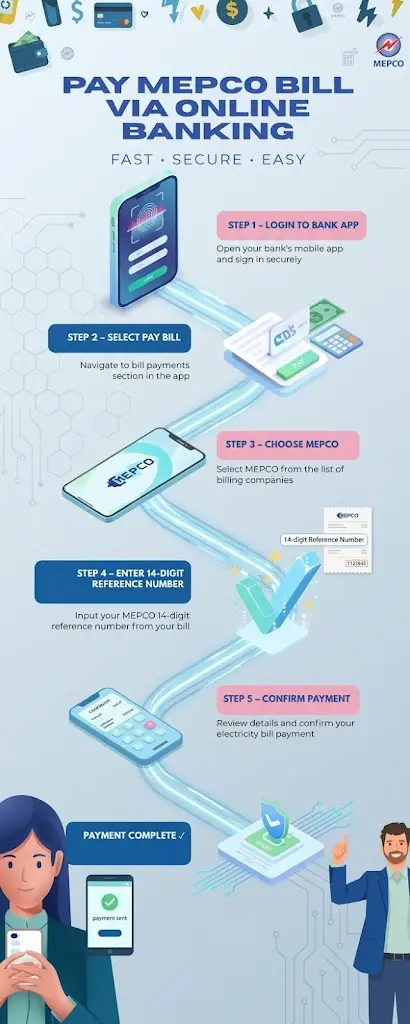
Many Pakistani banks provide utility bill payment through mobile banking or internet banking.
The exact menu names vary between banks, but the general process is similar.
General Steps
- Open your bank’s official mobile application or internet banking service.
- Sign in securely.
- Open the bill payment or utility payment section.
- Select electricity.
- Select MEPCO if it is listed.
- Enter the required reference number or consumer information.
- Review the bill details.
- Confirm the payment.
- Save the transaction confirmation.
Do not share your banking password, PIN, OTP, or authentication code with another person.
If the bank displays the consumer name and bill amount before payment, compare these details with your bill.
Pay MEPCO Bill Through EasyPaisa
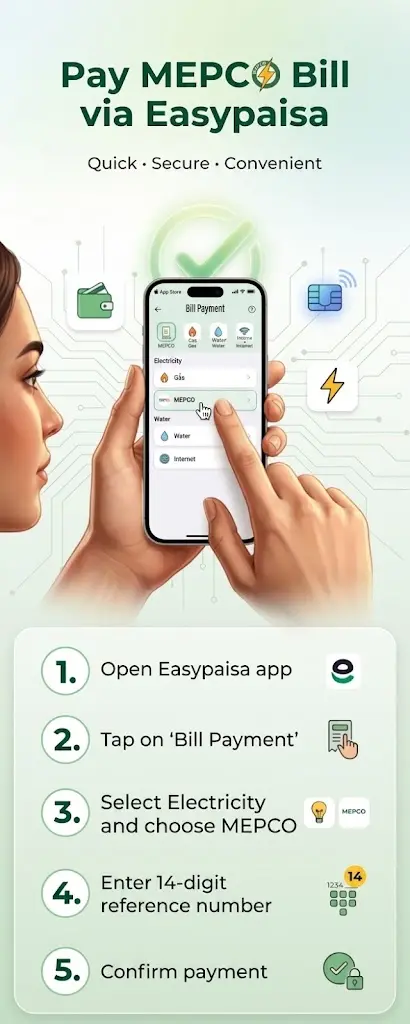
EasyPaisa may provide electricity bill payment through its mobile application.
Because app menus can change, use the current version of the application and follow the utility bill payment options shown there.
General Process
- Open the EasyPaisa application.
- Sign in to your account.
- Open Bill Payment or the relevant utility payment option.
- Select electricity.
- Select MEPCO.
- Enter the requested bill information.
- Review the displayed consumer and bill details.
- Confirm the payment.
- Save the transaction confirmation.
Before confirming, make sure the bill details match the connection you intend to pay.
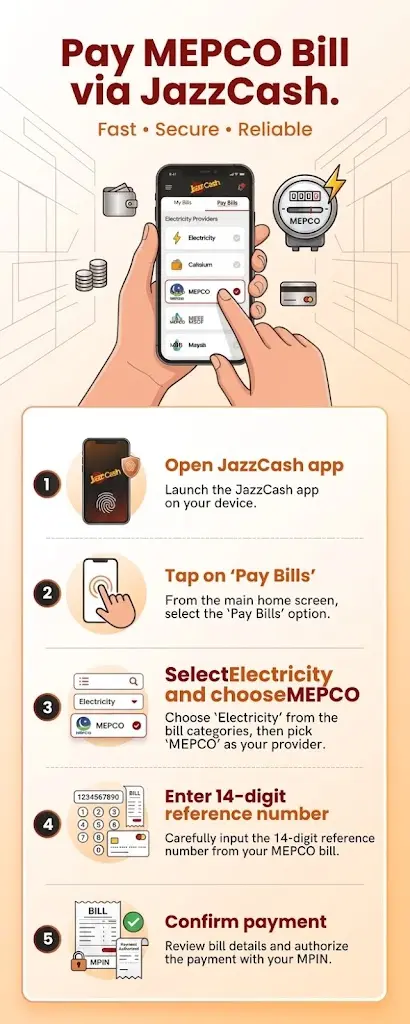
Pay MEPCO Bill Through JazzCash
JazzCash may also support utility bill payments through its mobile application and other available channels.
General App Process
- Open the JazzCash application.
- Log in securely.
- Select Bill Payment or Utility Bills.
- Choose electricity.
- Select MEPCO.
- Enter your reference number or the information requested by the application.
- Review the bill information.
- Confirm the payment.
- Keep the transaction ID or receipt.
The exact options available can change, so use the current instructions shown inside the official JazzCash service.
Payment Through an Agent
If you prefer cash payment, an authorized payment agent may be another option.
Take your bill or reference number with you and request a receipt after the payment is processed.
Other MEPCO Bill Payment Methods
Depending on availability, consumers may also find MEPCO bill payment options through other banking services, mobile wallets, or utility payment platforms.
The important rule is simple: use an authorized payment channel and keep the transaction receipt.
Do not assume that every website or application displaying a MEPCO payment option is legitimate.
Before entering payment information:
- Check the service provider
- Use the official application
- Verify the consumer information
- Check the amount
- Keep the confirmation
- Never share your PIN or OTP
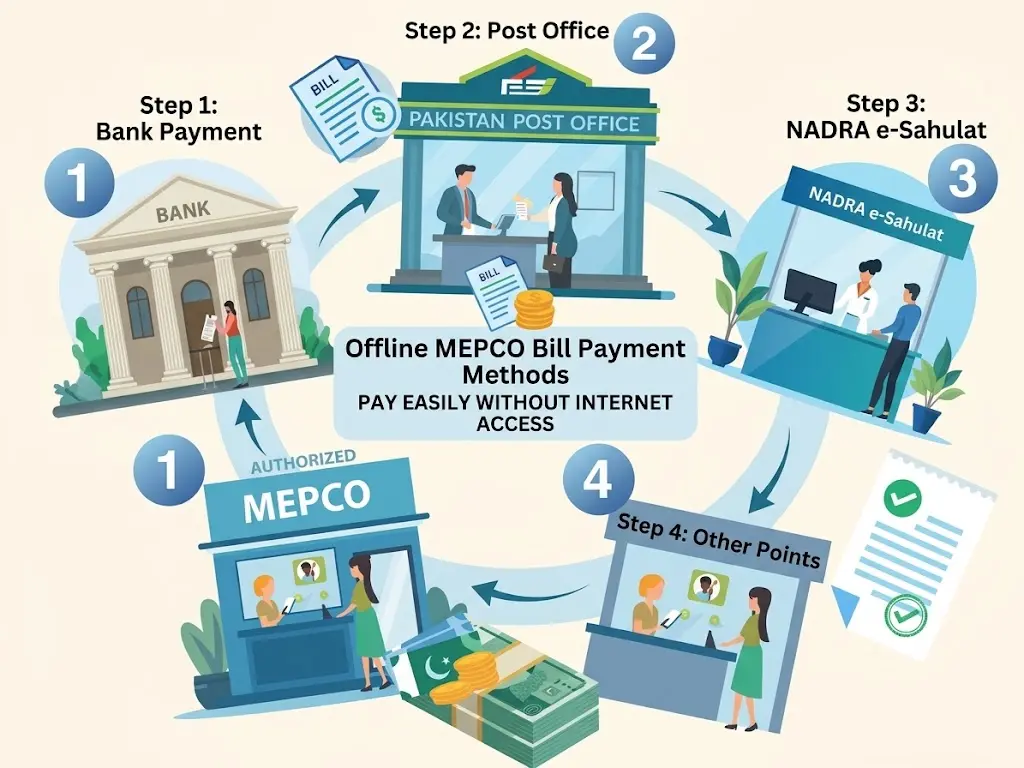
Offline MEPCO Bill Payment
Not everyone prefers online payments. Cash payment can still be useful for consumers who do not use mobile banking or who have limited internet access. Possible offline options include authorized bank branches, collection points, and other officially supported payment locations.
Paying at a Bank
- Visit a bank branch that accepts the relevant utility bill.
- Provide your MEPCO bill or reference number.
- Pay the required amount.
- Collect the payment receipt.
- Keep the receipt until the payment is reflected in your records.
Paying at an Authorized Collection Point
Provide the required bill information to the authorized collection agent and make sure you receive proof of payment.

Banks
- Visit a bank branch that accepts MEPCO bill payments.
- Give your 14-digit reference number or consumer ID at the counter.
- Pay the bill amount to the cashier.
- Take the payment receipt and keep it as proof.
Post Offices
- Visit your nearest post office that accepts bill payments.
- Give your MEPCO bill or reference number to the officer.
- Pay the bill amount at the counter.
- Take the payment receipt and keep it for your records.

NADRA e-Sahulat Centers
- Visit any NADRA e-Sahulat center.
- Tell the operator that you want to pay your MEPCO bill.
- Provide your reference number and bill amount.
- After payment, collect the transaction slip as proof.
Authorized Bill Collection Points
- Visit an official MEPCO collection center near you.
- Give your consumer ID or reference number.
- Pay your bill in cash or through an approved payment method.
- Take the receipt as proof of payment.
What Happens If You Miss the MEPCO Bill Due Date?
Missing the due date can result in additional charges or other consequences under the applicable electricity billing rules. If you notice that your bill is already overdue, check the current amount payable on the bill before making payment.
Do not calculate the late amount yourself using an old bill. The current bill or authorized payment system should be used to determine the amount required. If you are facing a genuine payment problem, contact MEPCO or the relevant customer service channel and ask about the options available for your connection.
MEPCO Peak Hours
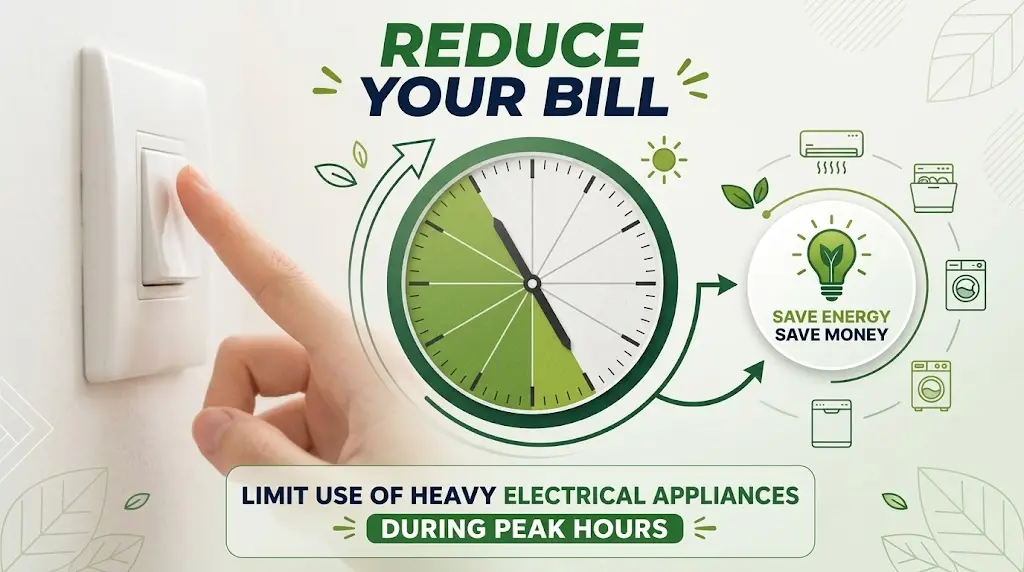
Peak hours are periods when electricity demand is high. Using large appliances during high-demand periods can increase electricity consumption and may be more expensive for certain consumer categories and tariff structures.
The exact peak-hour schedule can depend on the applicable tariff and connection type, so consumers should check the current information relevant to their connection.
Appliances to Monitor
During periods of high electricity demand, pay attention to appliances such as:
- Air conditioners
- Electric heaters
- Water pumps
- Washing machines
- Electric water heaters
- Irons
- Other high-power appliances
Moving flexible electricity use to lower-demand periods can help households manage consumption.
MEPCO Bill Calculator
A MEPCCO Bill Calculator can help estimate electricity costs before the official bill arrives.
It is useful for consumers who want to understand how changes in unit consumption may affect their monthly electricity expense.
A calculator may consider factors such as:
- Units consumed
- Applicable tariff
- Taxes
- Surcharges
- Adjustments
- Fixed charges, where applicable
However, an estimated calculation should not be treated as the final official bill.
The actual bill can include charges or adjustments that depend on the current tariff, billing period, consumer category, government decisions, and other applicable factors.
Why Use a Bill Calculator?
A calculator can help you:
- Estimate monthly expenses
- Compare different usage levels
- Understand the effect of higher consumption
- Monitor electricity usage
- Plan household expenses
- Identify unusually high consumption
How MEPCO Electricity Bills Are Calculated
Your electricity bill is not simply the number of units multiplied by one fixed price. The final amount can depend on your consumer category, applicable tariff structure, electricity consumption, taxes, adjustments, surcharges, and other charges.
A simplified billing process looks like this:
1. Meter Reading
The electricity meter records consumption.
2. Consumption Calculation
The relevant meter readings are used to determine the units consumed during the billing period.
3. Tariff Application
The applicable tariff is applied according to the consumer category and consumption.
4. Taxes and Adjustments
Applicable taxes, surcharges, and adjustments are added according to the current rules.
5. Bill Generation
The billing system produces the electricity bill showing the relevant charges and payment information.
6. Bill Delivery or Online Availability
The bill can then be provided through the available delivery and digital channels.
This process explains why two consumers with similar unit consumption can sometimes have different bills if their connection categories or other applicable charges differ.
MEPCO Meter Reading
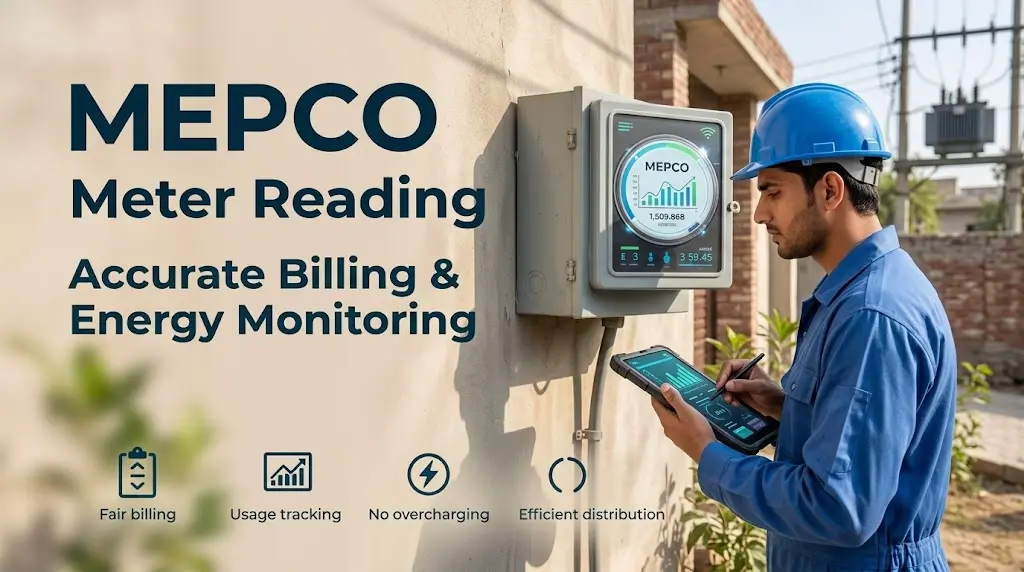
Meter reading is an important part of electricity billing.
The reading recorded for your connection helps determine the amount of electricity consumed during the billing period.
Consumers should make a habit of checking their meter and comparing the reading with the information shown on their bill.
Why Check Your Meter?
Regular checks can help you:
- Understand your electricity usage
- Notice unusually high consumption
- Identify possible reading differences
- Compare current and previous consumption
- Report a suspected billing issue sooner
If the reading on your bill appears significantly different from your actual meter reading, record the current meter reading and contact MEPCO through an appropriate complaint channel.
Understanding Taxes and Surcharges on a MEPCO Bill
Electricity bills can contain several charges in addition to the basic electricity cost. The names and amounts of these charges can change according to government and regulatory decisions, so consumers should always use their current bill when checking the exact amount.
Fuel Price Adjustment (FPA)
Fuel Price Adjustment is related to changes in the cost of fuel used in electricity generation.
When applicable, an adjustment can appear on the electricity bill.
General Sales Tax (GST)
GST is a government tax that may apply to electricity charges according to the relevant rules.
The amount shown on the bill depends on the applicable calculation.
TV Fee
A television fee may appear as a separate line on an electricity bill when applicable.
If the charge is not currently being applied, the bill may show zero or omit the applicable amount.
FC Surcharge
The Financing Cost surcharge is another charge that may appear on electricity bills according to the applicable policy.
Quarterly Tariff Adjustment
Quarterly tariff adjustments can change the amount consumers pay based on approved electricity pricing adjustments.
Deferred Amount or Previous Balance
If an amount from a previous billing period has been deferred, carried forward, or remains outstanding, it can appear on a subsequent bill.
Why Is It Important to Understand These Charges?
When your bill suddenly increases, looking only at the electricity units may not explain the entire difference.
Compare:
- Current units
- Previous units
- Electricity charges
- Taxes
- Surcharges
- Adjustments
- Previous balance
- Due-date amount
This gives you a clearer picture of why the total changed.
What Is MEPCO and Where Does It Provide Electricity?
MEPCO stands for Multan Electric Power Company.
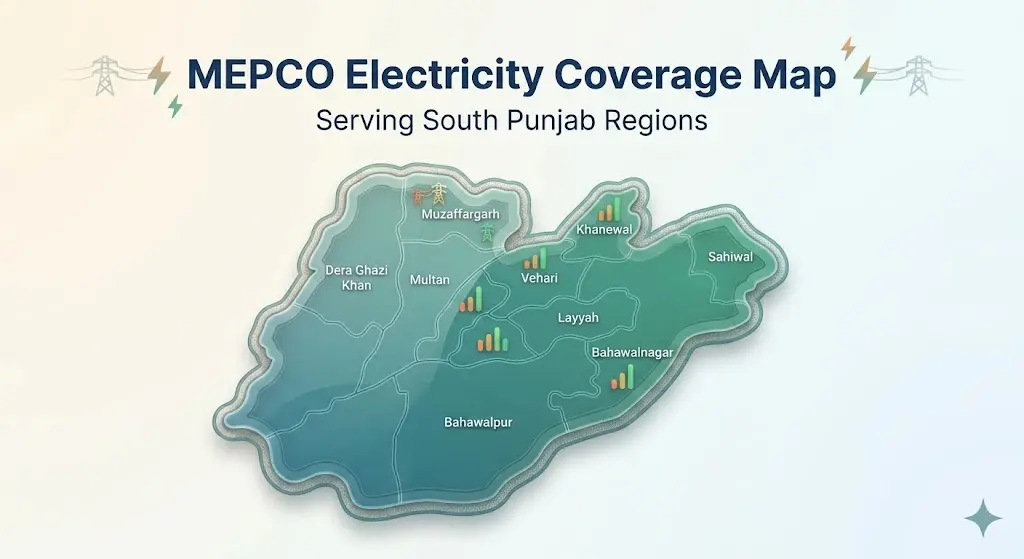
It is one of Pakistan’s electricity distribution companies and serves consumers across a large area of South Punjab. The original homepage identifies areas including Multan, Bahawalpur, Dera Ghazi Khan, Sahiwal, Vehari, Khanewal, and Rahim Yar Khan.
MEPCO’s responsibilities include electricity distribution, meter reading, billing, consumer services, complaint handling, and other electricity-related operations within its service area.
Who Uses MEPCO Electricity Services?
MEPCO consumers can include:
- Residential households
- Shops
- Offices
- Commercial businesses
- Industrial consumers
- Other eligible electricity connections
The exact services, tariff category, and billing structure depend on the consumer’s connection.
MEPCO Service Areas
MEPCO operates across a broad region of South Punjab.
Consumers should confirm that their electricity connection falls within MEPCO’s service area before using MEPCO-specific services.
The major areas commonly associated with MEPCO include:
- Multan
- Bahawalpur
- Dera Ghazi Khan
- Sahiwal
- Vehari
- Khanewal
- Rahim Yar Khan
- Surrounding districts and service areas
The exact administrative structure and service boundaries can change, so users should confirm local information through current official sources when necessary.
MEPCO Online Complaint Registration
A billing problem, meter issue, power interruption, or another service concern may require a formal complaint.
MEPCO-related complaints can be submitted through available customer service channels.
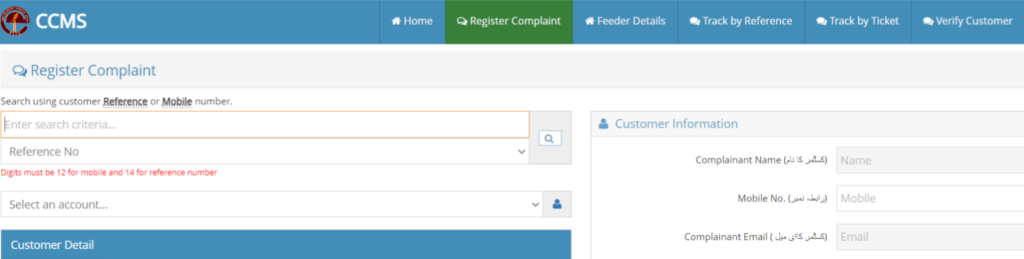
The original homepage references the Customer Complaint Management System (CCMS) as an online complaint route.
General Complaint Process
- Open the relevant complaint service.
- Provide the requested connection information.
- Select or describe the problem.
- Submit the complaint.
- Save the complaint number.
- Use the complaint number to follow up when tracking is available.
Information You Should Keep Ready
Before registering a complaint, have your:
- Reference number
- Consumer information
- Registered phone number, where required
- Recent bill
- Meter details, if relevant
- Complaint description
- Previous complaint number, if applicable
A clear description can make it easier for the responsible department to understand the issue.
MEPCO Complaint Tracking
If you have already submitted a complaint and received a complaint number, keep that number safe.
Complaint tracking allows consumers to check the progress of an existing complaint where the relevant tracking system is available.
When contacting customer support, provide the complaint number instead of submitting the same complaint repeatedly.
Common Reasons for Complaints
Consumers may need assistance with:
- Incorrect meter readings
- Unexpected billing amounts
- Meter problems
- Power outages
- Damaged electricity equipment
- Connection issues
- Name or connection information
- Payment-related problems
- Other electricity service issues
For emergencies involving dangerous electrical conditions, prioritize personal safety and contact the appropriate emergency or electricity service channel.
MEPCO Customer Support
MEPCO provides different customer support channels for consumer issues.
The original homepage lists:
- Helpline: 118
- SMS: 8118
- Online complaint system
- Customer service centers
- Regional and circle offices
These contact details and services should be verified periodically because helpline procedures can change.
When contacting customer support, keep your reference number and recent bill available.
This can help the representative identify your connection more quickly.
MEPCO Bill Tariff and Electricity Rates
Electricity tariffs are not permanently fixed.
Rates can change because of government decisions, NEPRA notifications, tariff adjustments, fuel-related changes, subsidies, taxes, and other factors.
For this reason, an old tariff table should never be presented as the permanent ” latest MEPCO rate “.
The original homepage contains a residential, commercial, and industrial tariff table.
For a useful and trustworthy homepage, tariff information should always show the effective date and be updated whenever the applicable rates change.
Residential Tariff
Residential consumers may be charged according to consumption slabs and the applicable consumer classification.
The amount paid per unit can change depending on the number of units consumed and the tariff category.
Why Consumption Slabs Matter
Using more electricity can move a consumer into a different billing slab or affect the applicable calculation.
Therefore, reducing unnecessary consumption can be useful not only because fewer units are used, but also because the applicable tariff structure can affect the final bill.
| Category | Units per Month | Tariff (PKR/unit) |
|---|---|---|
| Protected | 1 – 50 | 5.00 |
| Protected | 51 – 100 | 7.77 |
| Protected | 101 – 200 | 14.00 |
| Unprotected | 1 – 100 | 22.00 |
| Unprotected | 101 – 200 | 27.00 |
| Unprotected | 201 – 300 | 36.00 |
| Unprotected | 301 – 700 | 45.00 |
| Unprotected | Above 700 | 68.00 |
Commercial MEPCO Tariff
Commercial consumers such as shops, offices, and businesses can have a different tariff structure from residential consumers.
The applicable rate may depend on:
- Connection category
- Sanctioned load
- Units consumed
- Time-of-use arrangement
- Fixed charges
- Applicable government adjustments
Businesses should use their current bill and the latest applicable tariff notification when calculating electricity costs.
| Type / Load | Tariff (PKR/unit) | Fixed Charges (PKR/month) |
|---|---|---|
| General Supply – <5 kW | 36.00 | 500 – 700 |
| General Supply – ≥5 kW | 70.00 | 800 – 1000 |
Industrial MEPCO Tariff
Industrial electricity connections can have more complex billing structures because electricity use can be significantly higher and may involve demand or time-of-use considerations.
Industrial consumers should not rely on a general residential bill calculator to estimate their complete electricity cost. The applicable industrial tariff depends on the connection category and current approved tariff.
| Category | Tariff (PKR/unit) | Notes |
|---|---|---|
| B-1 (Light) | 45 – 60 | Fixed charges apply |
| B-2 / B-3 | 55 – 70 | Peak/off-peak rates vary |
| B-4 (Large) | 70 – 85 | Metered + demand charges |
MEPCO Bill Installment Facility
A high electricity bill can create financial pressure, particularly for households and businesses with unusually large consumption or accumulated charges. Where an installment facility is available, consumers can ask the relevant MEPCO office about the current rules and eligibility requirements.
The original homepage includes an installment procedure and officer-level limits. These figures should be verified against the latest MEPCO instructions before publishing them as current rules.
General Process
| Action | Details / Requirements |
|---|---|
| Visit MEPCO Office | Approach your local MEPCO office or regional customer service center. |
| Submit Request | Fill out the application form for bill installments and provide valid reasons for financial difficulty. |
| Attach Documents | Provide supporting documents, such as CNIC / ID Card, latest electricity bill, proof of income, or financial hardship. |
| Verification | MEPCO staff will verify your account, consumption history, and submitted documents. |
| Installment Approval | If approved, MEPCO will provide a payment schedule outlining monthly installment amounts. |
| Payment of Installments | Consumers pay installments on or before the due dates to avoid penalties or disconnection. |
Documents That May Be Requested
Depending on the case, you may be asked for:
- CNIC or identification
- Latest electricity bill
- Connection details
- Supporting financial information
- Other documents required by the relevant office
Do not assume that an installment request is automatically approved.
Approval depends on the applicable rules and the authority responsible for the connection.
MEPCO Bill Installment Plans
Consumers of MEPCO can request bill installment plans in case of high charges. Approval depends on the bill amount and the concerned officer, with specific limits on installments and payable amounts, as shown in the table below.
| Competent Officer | Installments of Bills |
|---|---|
| SDO / AM(O) | 03 monthly installments for bill amounts up to Rs. 50,000 |
| RO / AM (CS) | 03 monthly installments for bill amounts up to Rs. 50,000 |
| XEN / DM(O) | 03 monthly installments for bill amounts up to Rs. 200,000 |
| SE / Manager(O) | 04 monthly installments for bill amounts up to Rs. 500,000 |
| Director Commercial | 05 monthly installments for bill amounts up to Rs. 1,000,000 |
| CSD | 12 monthly installments for bill amounts up to Rs. 20 Million |
| CEO | Maximum 10 days for all amounts |
MEPCO Bill Due-Date Extension
If a consumer cannot deposit the bill on time because of a specific problem, they may ask the relevant MEPCO office whether a due-date extension is available. The original homepage provides officer-level extension limits, but these should be updated and verified before being presented as current information.
If you need an extension:
- Check your current bill.
- Contact the appropriate MEPCO office.
- Explain the reason for the request.
- Submit any required documents.
- Ask for written confirmation if an extension is approved.
Do not assume that an extension is valid until it has been officially approved.
MEPCO New Electricity Connection
Consumers who need electricity at a new property can apply for a new connection through the relevant MEPCO process.
The exact requirements depend on the type of connection, property, load, and other technical considerations.
Common Connection Categories
A new connection can generally involve:
- Residential connection
- Commercial connection
- Industrial connection
The required documents and technical requirements can differ between these categories.
Before Applying
Keep relevant property and identification documents ready.
You may need documents such as:
- CNIC
- Property ownership documents
- Tenancy documents, where applicable
- Wiring or electrical information
- Application forms
- Other documents requested by MEPCO
Always check the current official requirements before submitting an application.
MEPCO Demand Notice
After a new connection application reaches the relevant stage, a demand notice may be issued.
A demand notice can contain charges that the applicant must pay before the connection can proceed.
Depending on the connection, these may relate to:
- Security deposit
- Service charges
- Processing charges
- Meter-related charges
- Line extension work
- Other applicable costs
The amount depends on the connection type and technical requirements.
Keep Your Demand Notice Records
Keep copies of:
- Application information
- Demand notice
- Payment receipt
- Approval documents
- Correspondence
- Installation information
These records can be useful if you need to follow up on the connection.
MEPCO Meter Types
The type of electricity meter depends on the connection and load requirements. Common categories discussed by MEPCO consumers include single-phase and three-phase meters, while larger commercial and industrial consumers may require other arrangements.
Single-Phase Meter
Single-phase connections are commonly associated with ordinary residential electricity use where the required load is suitable for this type of connection.
Three-Phase Meter
Three-phase connections can be used where a higher electrical load is required, including some larger homes and commercial properties.
Smart or AMI Meter
Advanced metering infrastructure can provide more modern methods of meter reading and electricity data management. The exact features available depend on the meter and the system installed on the connection.
Choosing a Meter
Consumers should not select a meter type based only on personal preference. The appropriate meter depends on:
- Required load
- Connection category
- Electrical installation
- Technical feasibility
- MEPCO approval
| Feature | Single-Phase Meters | 3-Phase Meters |
|---|---|---|
| Meter Types | Old Meters, AMI Meters | Old 3-Phase, AMI 3-Phase, Green Meters |
| Suitable For | Domestic / Residential Consumers | Residential (high load) or small commercial |
| Typical Load | Low electricity load (typical homes, apartments) | Medium to high load (larger homes, multi-story buildings, small businesses) |
MEPCO Connection Name Change
If ownership or occupancy of a property changes, the electricity connection information may need to be updated.
A name-change request normally requires documentation and approval through the applicable MEPCO process.
Documents may include:
- CNIC
- Existing bill
- Property ownership evidence
- Sale or transfer documentation
- Tenancy agreement, where applicable
- Other required documents
The exact requirements depend on the circumstances.
MEPCO Load Extension
If you need more electricity load than your current connection allows, you may need to apply for a load extension.
For example, a property that adds several high-power appliances may require a higher sanctioned load.
A load extension can involve:
- Application
- Document submission
- Technical assessment
- Feasibility review
- Applicable charges
- Approval
- Implementation
Do not increase the electrical load through unauthorized work.
MEPCO Meter Relocation
Sometimes a consumer needs to move an electricity meter to another approved location on the same property.
Meter relocation is not simply a matter of physically moving the meter yourself.
The request should follow the relevant MEPCO procedure because the meter, wiring, safety requirements, and connection records must remain compliant. Contact the relevant MEPCO office before making any changes.
MEPCO Category Change
A consumer may need to request a category change if the use of a property changes.
For example, a connection used for a residential purpose may require a different classification if the property becomes a commercial operation.
Such changes can involve documentation, technical review, and approval.
Never assume that changing the physical use of a property automatically changes its electricity tariff category.
What Is MEPCO MIS?
MEPCO MIS refers to the management information systems used for internal electricity and consumer record management.
Key Functions of MEPCO MIS
| Function | Purpose |
|---|---|
| Billing Management | Monthly bill generation and adjustments |
| Meter Reading Entry | Manual & AMI meter readings |
| Consumer Records | Name, category, load, and CNIC data |
| Installments & Corrections | Approved bill installments and billing issues |
| Complaint Handling | Linked consumer complaint tracking |
It also states that the MIS is not intended for public access.
Consumers generally do not need access to an internal management system to check their electricity bill.
If you need to correct information on your connection, use the applicable consumer service procedure.
How to Reduce Your MEPCO Electricity Bill
Reducing an electricity bill begins with understanding where your units are going. You do not always need to stop using important appliances. Small changes in daily habits can help reduce unnecessary consumption.
Use LED Lights
LED bulbs generally consume less electricity than older, inefficient lighting options. Replace unnecessary high-consumption lighting where practical.
Use Inverter Appliances
Energy-efficient inverter air conditioners and other appliances can help manage electricity consumption when used correctly. However, the efficiency of an appliance depends on its model, condition, usage, temperature settings, and operating environment.
Turn Off Unused Appliances
Do not leave lights, fans, chargers, televisions, or other devices running when they are not needed.
Maintain Air Conditioners
A poorly maintained air conditioner can work harder than necessary. Clean filters and proper servicing can help the appliance operate more efficiently.
Monitor Monthly Units
The number of units on your bill gives you a useful measure of electricity consumption. Compare your units month by month rather than looking only at the rupee amount.
Use High-Power Appliances Carefully
Water heaters, irons, pumps, air conditioners, and other high-power appliances can have a noticeable effect on monthly consumption. Use them only when necessary and, where suitable, shift flexible use away from expensive or high-demand periods.
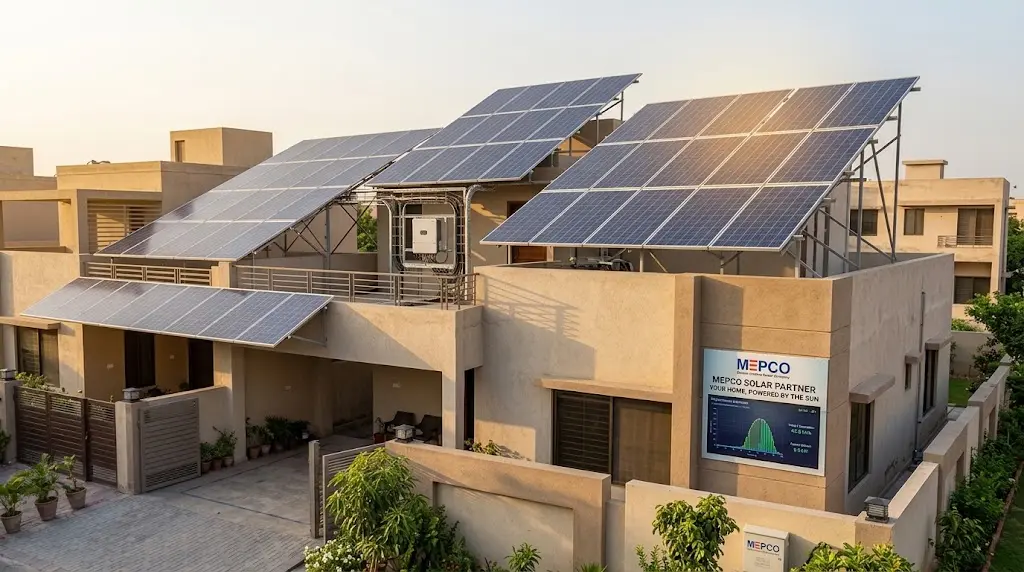
Consider Solar Energy
Solar power can reduce dependence on grid electricity for suitable properties. However, the cost, system size, roof condition, battery requirements, net-metering rules, and installation quality should all be considered before making a decision.
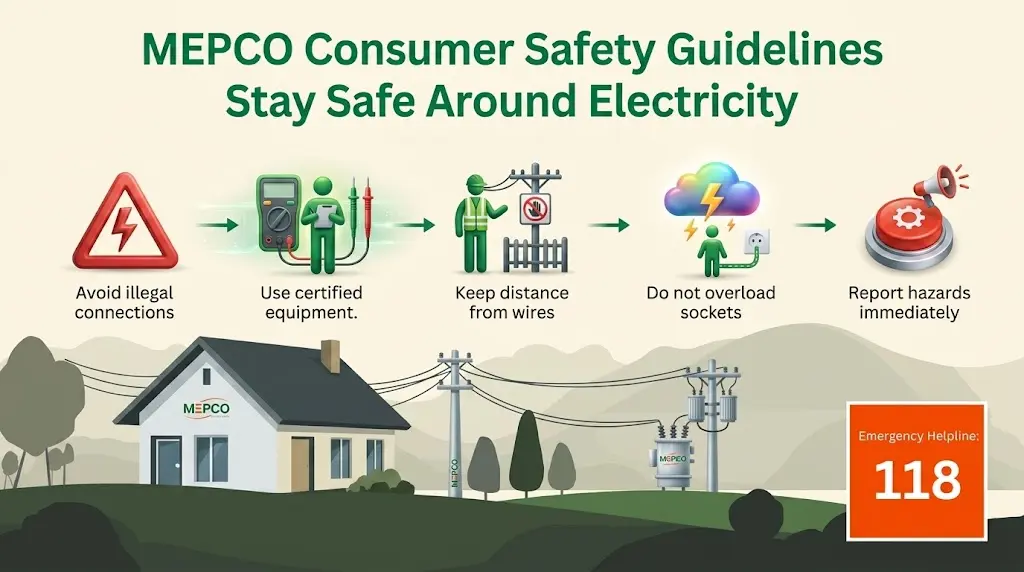
MEPCO Electricity Safety Guidelines
Electricity can be dangerous. A billing website should also help consumers understand basic safety precautions.
Avoid Illegal Connections
Do not use unauthorized connections or wiring arrangements.
Illegal connections can create serious safety risks and can also damage electrical equipment.
Keep Away From Overhead Lines
Never approach overhead electricity lines, especially when carrying long metal objects or working on rooftops.
Do Not Touch Exposed Wires
Treat every exposed electrical wire as dangerous.
Do not attempt to repair damaged electrical infrastructure yourself.
Do Not Overload Sockets
Too many appliances connected to one outlet can cause overheating and increase the risk of electrical fire.
Keep Children Away From Electrical Equipment
Children should not play around meters, transformers, electrical poles, exposed wiring, or other electricity equipment.
Be Careful During Rain
Water and electricity are a dangerous combination.
Avoid flooded electrical areas and stay away from damaged electrical equipment during storms.
Report Dangerous Conditions
If you notice:
- Hanging wires
- Broken poles
- Sparks
- Damaged electrical equipment
- Exposed wires
- Other dangerous conditions
keep a safe distance and report the problem through the appropriate electricity service channel.
What to Do If Your MEPCO Bill Looks Wrong
If your bill appears unusually high, do not immediately assume that the meter is defective.
Start by comparing the current bill with the previous one.
Check:
- Current meter reading
- Previous meter reading
- Units consumed
- Billing period
- Tariff category
- Taxes
- Surcharges
- Adjustments
- Previous balance
- Due-date amount
If the meter reading shown on the bill does not match your actual meter reading, record the actual reading and contact MEPCO.
If the readings are correct but the amount still seems unusual, ask customer support to explain the billing components.
Keep Evidence
If you need to make a complaint, keep:
- Copy of the bill
- Photograph of the meter reading
- Previous bill
- Reference number
- Complaint number
- Payment receipt
Clear records can make follow-up easier.
How to Compare Your MEPCO Bills
Comparing bills is one of the easiest ways to understand changes in electricity costs.
Do not compare only the total rupee amount.
Instead, compare:
| Item | Previous Bill | Current Bill |
|---|---|---|
| Units consumed | — | — |
| Billing days | — | — |
| Meter reading | — | — |
| Electricity charges | — | — |
| Taxes | — | — |
| Adjustments | — | — |
| Previous balance | — | — |
| Total amount | — | — |
If the amount increased while units stayed similar, check the tariff and additional charges.
If both units and the amount increased, higher consumption may be the main reason.
Common MEPCO Bill Problems and What to Check
Bill Not Found
Check that your reference number is correct.
Compare every digit with your previous bill.
Wrong Consumer Details
If the name or other connection information appears incorrect, contact the relevant MEPCO office.
Unexpectedly High Units
Compare the current meter reading with the bill and previous month.
Bill Did Not Arrive
Use the available online bill service to obtain a copy and check the due date.
Payment Not Showing
Keep the payment receipt or transaction ID and contact the payment provider or relevant electricity service if the payment is not reflected.
Duplicate Bill Needed
Use the available online bill-checking service to retrieve the current bill copy.
MEPCO Bill Checking on Mobile
Most consumers now use smartphones to manage routine tasks, and checking an electricity bill from a mobile device can be more convenient than using a computer.
When using a phone:
- Open a trusted browser.
- Visit the bill-checking page.
- Keep your previous bill nearby.
- Enter your reference number carefully.
- Review the displayed information.
- Save the bill if necessary.
Avoid saving sensitive banking information in unknown websites.
For payments, use the official mobile banking application or wallet application rather than entering payment credentials into an unfamiliar webpage.
Is MEPCCO-bill.pk an Official MEPCO Website?
MEPCCO-bill.pk is an informational bill-checking website and should not be confused with MEPCO’s own corporate website or official government service. This distinction is important.
Users should use this website for the information and tools provided here, but for official complaints, regulatory matters, connection applications, tariff notifications, or other matters requiring authoritative confirmation, users should verify information through the relevant official MEPCO, PITC, NEPRA, or government source.
Important Information About Changing MEPCO Rules
Electricity billing information can change.
Tariffs, taxes, surcharges, payment methods, complaint procedures, SMS services, connection requirements, and load-shedding schedules are not necessarily permanent.
For this reason:
- Check the date of tariff information.
- Verify payment methods before using them.
- Confirm contact numbers.
- Use current complaint instructions.
- Do not rely on old load-shedding schedules.
- Verify new connection requirements.
- Check current government and regulatory notifications for major tariff changes.
Frequently Asked Questions About MEPCO Bill
How can I check my MEPCO bill online?
You can check your MEPCO electricity bill online by using the bill-checking service and entering the reference number printed on your previous electricity bill. Where supported, a consumer ID may also be used.
How many digits is a MEPCO reference number?
The reference number used for MEPCO bill checking is generally a 14-digit number. Enter all digits exactly as shown on your previous bill.
Can I check my MEPCO bill without a reference number?
If you do not have your reference number, check an old electricity bill first. Depending on the available service, a consumer ID may also be accepted. If neither is available, contact the appropriate MEPCO customer service channel.
Can I check my MEPCO bill using CNIC?
CNIC is not the normal identifier used for routine duplicate-bill checking. Your reference number is the most useful information to have when checking a bill online.
Can I download my MEPCO duplicate bill?
If the bill-checking service provides a printable or downloadable bill, you can save a copy after retrieving your bill.
How can I pay my MEPCO bill online?
Depending on current availability, you may be able to pay through online banking, mobile banking applications, mobile wallets, or other authorized payment channels. Always verify the consumer details before confirming payment.
How can I pay my MEPCO bill without internet?
You can use an authorized bank branch, collection point, or other supported offline payment channel. Keep the receipt after making the payment.
What should I do if my MEPCO bill is too high?
First compare the current bill with previous bills. Check units consumed, meter readings, billing days, tariff, taxes, surcharges, adjustments, and previous balances. If something appears incorrect, contact MEPCO and register a complaint.
How can I complain about a MEPCO bill?
Use the available MEPCO customer complaint channels. Keep your reference number, bill, meter information, and any complaint number for follow-up.
How can I track a MEPCO complaint?
If you receive a complaint number after registering a complaint, use the applicable complaint tracking system to check its status.
What is the MEPCO peak hour?
Peak hours are periods when electricity demand is high. The exact timing can depend on the applicable tariff and connection type. Check the latest information relevant to your connection rather than relying on an old schedule.
How can I reduce my MEPCO bill?
Start by monitoring your monthly units. Use efficient appliances, switch off unnecessary devices, maintain air conditioners, avoid wasteful electricity use, and manage high-power appliances carefully.
Conclusion
Managing an electricity bill becomes much easier when you know where to find the information you need.
For most consumers, the first step is simple: keep your 14-digit MEPCO reference number safe and use it whenever you need to check your electricity bill.
Regular bill checking can help you monitor units, confirm the due date, understand changes in your monthly amount, and keep a record of your electricity expenses. If you notice something unusual, compare the current bill with previous bills before deciding what action to take.
You can also use available digital payment services to pay your bill without visiting a physical payment counter. When using banking apps or mobile wallets, always verify the consumer information and keep your transaction confirmation.
For billing disputes, meter problems, power issues, connection changes, new connections, or other service matters, use the appropriate MEPCO customer service channel and keep your reference number and supporting documents available.
Electricity tariffs and consumer procedures can change, so time-sensitive information such as tariff rates, payment options, complaint numbers, SMS services, load-shedding schedules, and connection requirements should always be checked against the latest available official information.

Azlan Haider
Azlan Haider is the Author of MEPCCO-bill.pk, focused on making MEPCO bill checking and electricity-related information easier to understand. He creates clear, practical guides covering online bills, duplicate bills, tariffs, payments, complaints, and consumer services, with information reviewed regularly for accuracy and usefulness.